
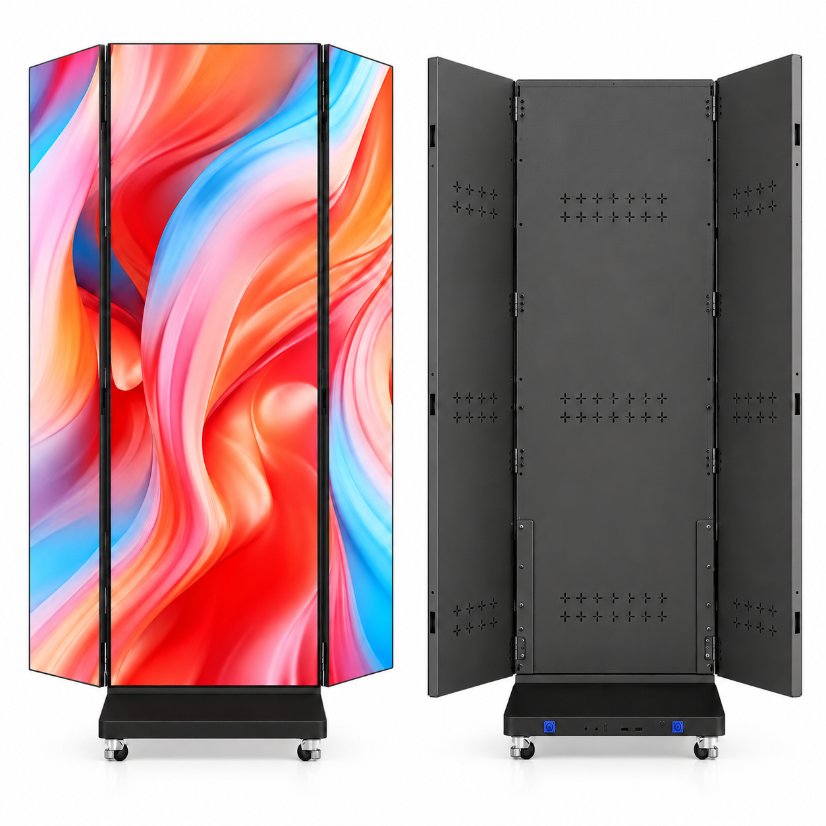
For an LED advertising-display quotation, ask HMS LED to mark the image-area boundary and identify the dimensions that describe it. Keep those values separate from cabinet dimensions and the overall base footprint. The linked foldable-display reference shows both a viewing surface and its physical housing, but the image does not establish measured screen size or pixel dimensions. Obtain the supplier’s version-specific drawing or data reference before comparing image areas or using the offer to define content requirements.
Identify the exact display version being quoted
Attach the exact P2.53 foldable-advertising-display product link and identify the official reference used in the enquiry. Ask the supplier to name the offered version and provide the corresponding dimensional reference. Keep the catalogue product name as an identifier rather than interpreting its model text as a verified technical parameter.
The official front and rear views help locate the product discussion. They do not establish the scale of the image surface or prove which dimensions the supplier intends to quote. Request a reference tied to the actual proposal so that information for another cabinet or display arrangement does not silently become the specification for this offer.
Separate image area from the physical outline
Ask the supplier to identify which boundary represents the proposed image area. Keep the cabinet’s external outline and any base or supporting structure on separate references. These objects can appear together in one product view, but a dimension describing the overall product should not automatically be labelled as the screen’s image width or height.
Request explicit labels rather than relying on the colour shown in a promotional image. A displayed graphic can help identify a viewing surface without proving the measured boundary of an active area. The supplier should explain which part each returned dimension describes, including any section of the physical product that lies outside the defined image reference.
Requested reference | Question for the supplier | Keep with the quotation
Image area | Which boundary defines the proposed image surface? | Marked area and version-specific dimensions
Cabinet outline | Which values describe the external housing? | Separate physical outline and units
Base footprint | Which values describe the support or base? | Independent footprint reference
Overall product | What components are included in the overall envelope? | Explicit object and dimension labels
Pixel information | What separate data applies to the offered image area? | Supplier-confirmed matrix or applicable data reference
Request a consistent image-area drawing
Ask the supplier to mark the width and height directions on the relevant viewing reference. Where the product is shown with angled sections, request clarification of the view and configuration used for the drawing. Do not estimate a flat image width by adding visible sections from a perspective photograph.
Keep the measurement unit and endpoints attached to the supplier’s returned values. If another reference uses a different configuration or boundary, ask the supplier to explain the relationship. The buying record should show what is being measured without creating an unconfirmed projection method, assigning missing values or inventing a dimensional tolerance.
Keep physical dimensions separate from pixel data
A physical image-area dimension does not by itself establish the pixel matrix of the offered display. If the buyer needs pixel information for a content discussion, request the applicable supplier data separately and keep it tied to the same version and image-area reference. Do not calculate or assert a matrix from the catalogue model name.
Likewise, a graphic shown on the product is not a verified content-file specification. Ask the supplier to identify the relevant content requirements for the proposed configuration when those are part of the enquiry. Keep those requirements separate from the physical size question, without promising a particular resolution, playback capability or control-system compatibility.
• Label image area, housing and base as different references.
• Request the supplier’s actual drawing for the offered configuration.
• Keep dimension directions, units and endpoints together.
• Request pixel and content information separately from physical size.
Compare offers using the same image-area question
Before comparing two size entries, check that both describe the same object. An overall cabinet measurement cannot be ranked against another offer’s image-area measurement as though the entries are equivalent. Request the missing distinction from the supplier instead of selecting an offer because its unlabeled number appears larger.
Keep other requirements separate from this comparison. Image-area clarification does not verify brightness, power consumption, environmental protection or suitability for a particular installation. Ask for any required supplier information for the actual application independently, and do not treat an accepted dimensional reference as approval of unrelated product performance or electrical conditions.
Send an image-area clarification request
An enquiry can read: For the linked foldable advertising-display offer, please mark the proposed image-area boundary and supply the corresponding dimension reference. Identify cabinet dimensions, base footprint and overall product dimensions separately. State the configuration represented by the drawing and provide applicable pixel or content data as separate version-linked information if included in the proposal.
Retain the supplier’s accepted reference with the quotation. If the offered cabinet or display configuration changes, request updated area and dimension labels. This creates a clear comparison record without estimating scale from a picture, decoding the model name into unverified specifications or giving instructions for powered operation, connection or installation.
Frequently asked questions
Can the cabinet width be labelled as image width?
Ask the supplier to identify the image-area boundary and keep external housing dimensions separately labelled.
Does the model name verify pixel pitch or resolution?
Use it as a product identifier and request applicable technical data for the actual offered version.
Can image dimensions be added from an angled photograph?
Request the supplier’s configuration-specific drawing rather than deriving a flat width from perspective views.
Does a confirmed image area establish brightness or outdoor suitability?
No. Keep any application, performance or environmental requirements as separate supplier confirmations.
Product and contact references
Product reference: https://hmsled.com/product/p2-53-foldable-advertising-display/
Related LED displays: https://hmsled.com/products/
Contact HMS LED: https://hmsled.com/contact/
HMS LED blog: https://hmsled.com/blog/